
Yes, it could. I’m also hosted by Blogger. If your blog is a Blogger-hosted blog, it could happen to you, too. Is it likely? Well, no – but mistakes do happen, as evidenced by Jill’s day on Thursday.
YES. Backing up your blog saves all your posts, comments, and layout so that even if something happens, what you have built is safe.
I have never backed up my blog before. I kept meaning to, but I never got around to it. Well, you better believe I did it on Thursday, and my plan is to do it weekly from now on. I’m almost ashamed to admit it, now that I know how easy it is. It’s ridiculously easy! And today, I’m going to show you how to do it too. If you’ve never backed up your blog, do it – right now, as soon as you’re done reading this post. If you have backed it up before, but maybe it’s been a while, here’s your reminder that you never know what might happen. It’s so little effort for that peace of mind… consider it, free blog insurance. ;)
The backup file hardly takes up any space – all my posts and comments (nearly 400 posts and over 1500 comments) took up 13.5MB, and my template was only 86.6K. Just to give you some idea of relative size – each photo I take with my camera is about 1MB all by itself – so these are very easy files to store!
Start out in your Blogger Dashboard. Drop the options menu down and go to the bottom selection, Settings.
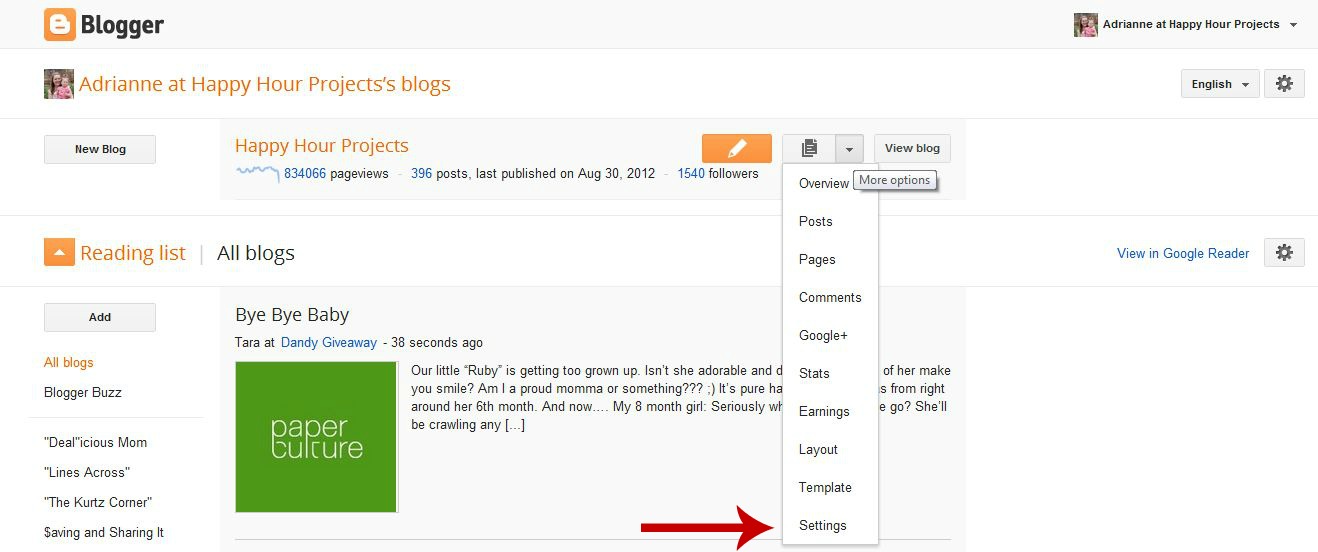
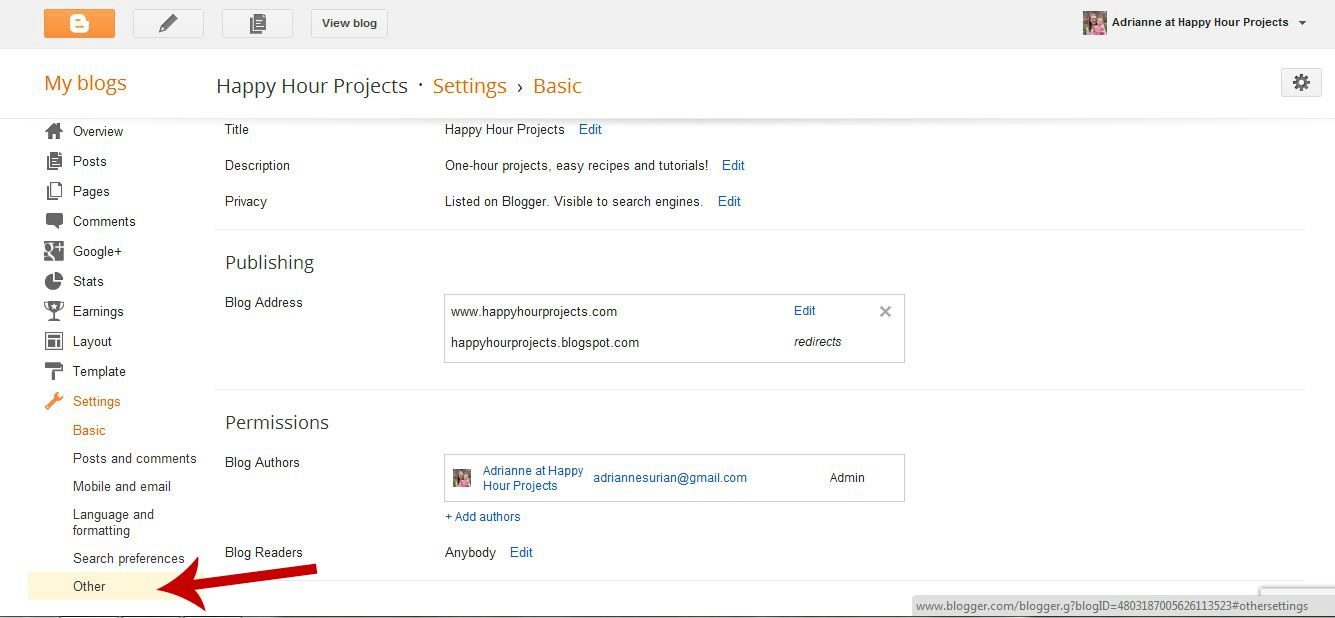
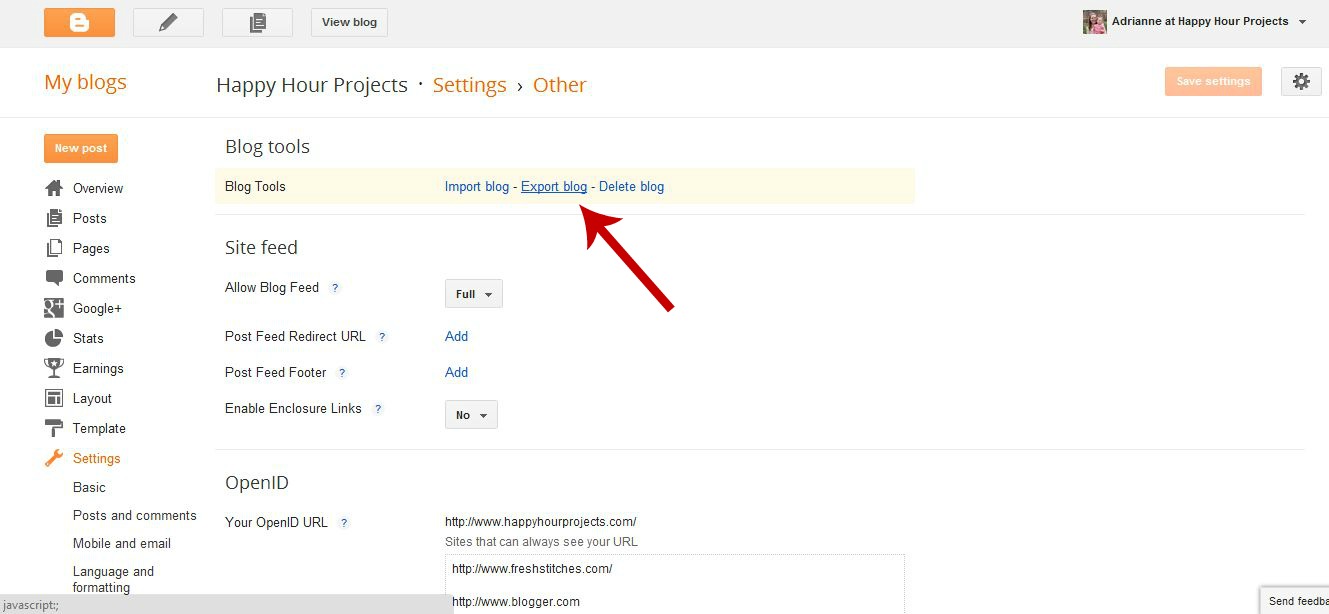
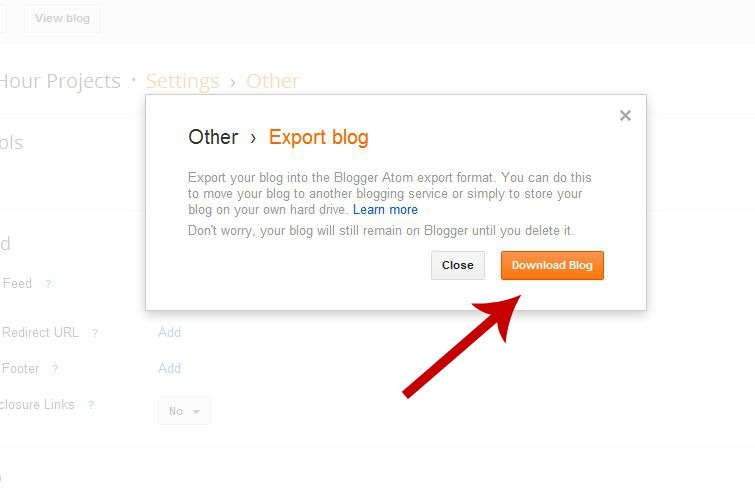
I use Chrome, so all my downloads go to a Download folder. From there, I just moved the file to a USB drive I use for blog things, but you could save this anywhere you like on your computer.
That’s it – you’ve just saved all your content and comments, which is the stuff that takes SOOO many hours to create. But – if you were to actually lose your blog, you’d have to re-design it from scratch, unless you also backup your template, too. This is also a super easy process.
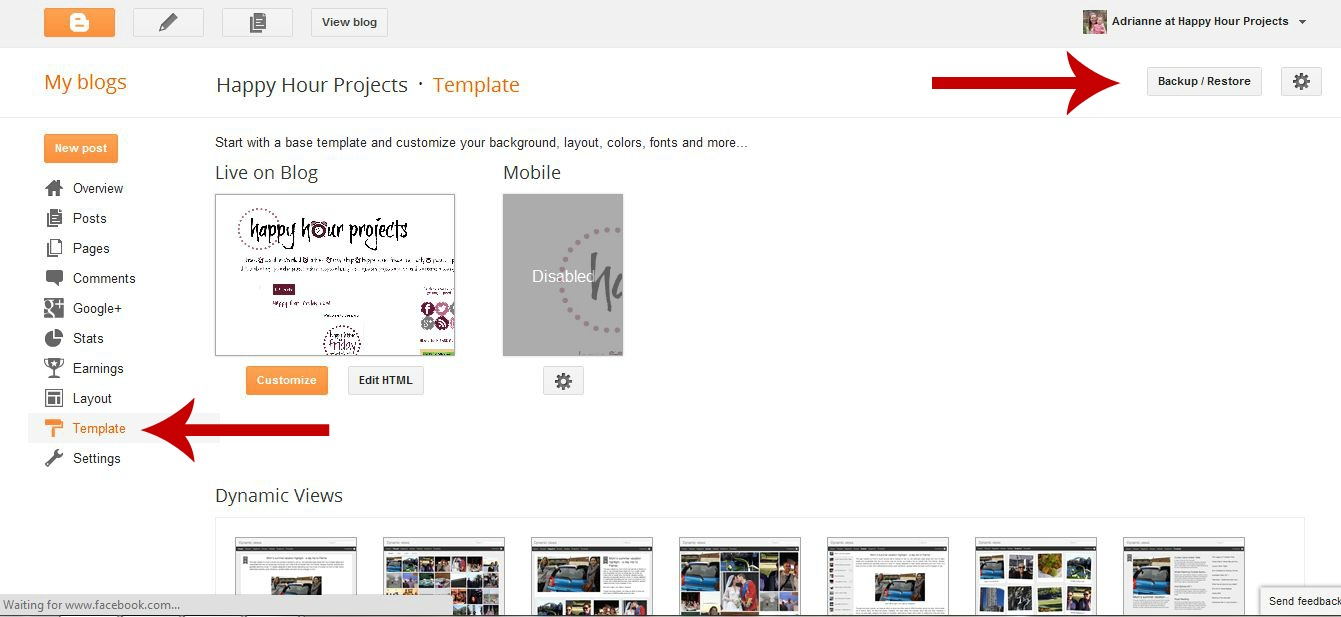
From your main menu, click on Template in the left column. Once you’re in the Template menu, click Backup/Restore in the upper right corner.
The pop-up box will come up, and you want to Download Full Template. Click that.

I found that I did want to rename the template – I added the date to it so I know when it was the last time I backed it up.
I’m planning a weekly backup from now on of my content, and a backup of the template only when I make changes to my blog design or layout. I’m also pretty sure I’m going to be making the move over to WordPress in the near future to give me that much more reassurance, but in the meantime, I’m protecting myself!
So – have you ever backed up your blog? How often do you do it?
I link up to these great parties! 
Great post. Thank you for sharing.
Oh my goodness thank you so much!!! It was super easy like you said!! Yay! Be blessed :)
You've been featured! Thanks for sharing your post at Wednesday Whatsits. I hope you'll be back again!
http://www.whitelightsonwednesday.com/2012/09/wednesday-whatsits-26.html
Thank you for this! I've been meaning to back up for a while, and was sure that there must be an easy way to do it :) All backed up and can panic no more!!
Thanks a lot..I just did it.. :)
luv
soumya http://mycraftgallery.blogspot.in/
I've never backed up my blog before…just finished after you simple instructions..Thank you! I will be doing this regularly now..it is a very good idea. Now I'm thinking I should look into how to backup my Picasa album too.
Thanks a ton for these tips. I've been meaning to get my blog backed up for a while but have just never gotten around to doing it. Am gonna get to it right away.
Just wanted to let you know I featured this today on my blog! You can check out the feature and grab a button here: http://practicallyfunctional.net/2012/09/the-fun-in-functional-link-party-16/
I have backed up my template before but have never backed up my content. I will be doing that pronto!
This is a GREAT reminder and thank you for the how to! I keep thinking I really need to back up the blog… and have I done it, no… will I… yes, right now in fact! :D
~Melissa
http://www.mywatermelonmoon.com
I love visitors! Come by and see me some time!
I'm trying to get 100 followers before the end of the month, hope you decide to join me too!
THANK YOU for this! I have heard horror stories and now I be doing this weekly as well.
One question… after I exported and download my blog, I got this message: Safari could not update this feed because the source file is no longer available.
I know you are not a troubleshooter or IT personnel, but you are smart! So just thought I'd ask if you've ever seen that before and why? Of course, I have to be the only one that this doesn't work for :(
Never done it before, just did it. Thanks a million!!!
Stacia @ http://feathersandsunshine.blogspot.com
Yikes! I never knew you could do this!!! Thanks, I will be backing up my blog for sure! :)
Oh yes!!! Had this horrible thing happen to me too! Now I have all of my posts emailed to me and save in a folder. Great tips on backing up here too that I'll now be doing. Thanks Adrianne!
That is really useful information. Thank you!
Ugh, how scary! Thanks for the reminder; I'm on a self-hosted WordPress blog, but no matter how you blog you should definitely be backing up! Weekly is probably a good idea. :-) Thanks for sharing at The Fun In Functional!
Hey A. First off what a sweetheart you are for helping Jill. When I got Jills e-mail I was totally freaked out for her. I didn't know you could even back your blog or that you should. I am downloading it now, thanks to your tutorial. Thank you so much for these tips. I am going to put them on my facebook page and blog this week. People need to know.
Danielle @ Blissful and Domestic
Awesome! Thanks for posting this!
New follower here! Following you via fb, g+ and twitter!
I've got this at the top of my to do list. I have wordpress and I'm so nervous about doing it. Thanks for the reminder and for linking up to The Gathering Spot this week:)
I had that happen to my blog last year. I just about had a heart attack…years of posts…poof….just gone. Luckily my blog was restored fairly quickly. VERY GOOD advice. :)
Thank YOU! Thank you thank you thank you thank YOU!!!!!
Thanks for this. Great info. Love all the blogger screen shots and arrows (click this, click that). Makes it easy for us. Thanks again.
Yes, I do back up, but not as often as I should. Thanks for the reminder!!! I lost my blog for an afternoon, a few months ago… not a nice feeling.
I have been using a computer since 2001, and really STILL have no idea about stuff.. Unless someone like you comes along and gives us Computer Dummies what we need to know.. I Thank You………..And will do this right NOW….
Thank you! DONE :)
Thanks so much. I'm going to do it now. It looks so darn easy. Plus I'm pinning this now so others can benefit. Thanks, Linda
I have never backed up my blog. But I will be today!! Thanks for the great tutorial and everything. It looks much easier than I thought it would be.:)
Thanks, its been a long time since i've done mine, so i just did it again. You're awesome!
Thanks again for your help Adrianne!!! You are a life saver for helping me!
Jill
twoyellowbirdsdecor.blogspot.com
Just gave this amazing post a shout out!
http://4you-withlove.blogspot.com/2012/09/backing-up-your-blog-in-blogger-must.html
Marilyn
Great advice, Adrianne! That must have been so stressful for Jill … thanks for the reminder!
Adrianne,
This post is a lifesaver…thanks! I also was panic stricken when Jill sent out her e-mail saying that her blog was gone! Happy labor Day!
Marilyn
Thanks for the info! Just did it!
Thank you so much for this! – I never knew any of this important information. I do have a question – it seems like many other bloggers are switching to WordPress – I was just wondering why?
Thanks
Angie
godsgrowinggarden.com
Great reminder and tutorial. Just did mine.
I tend to do it once a month, but it's good to be reminded of it once in a while – I guess lots of us forget it!
I did it! Thanks for the instructions. I will be sharing the link to your post on Facebook!